


My Solitaire-Card Game
4.73.00 Reviews
App Specs
- Version
- 2.2
- Updated On
- License
- Free
- Downloads
- 10,000+
- Developer
- Misiona Puzzle
- Categories
- Card
- Platform
- Android
Screenshots
 Analysis by AppCompare
My first impression of My Solitaire was that it understands why people still return to classic card games: the rules are familiar, the pace is calm, and a short session can feel complete without demanding a large time commitment. This is a free solitaire game from Misiona Puzzle, aimed at players who want a straightforward card experience with a few modern touches rather than a large collection of unrelated modes.
The central appeal is traditional solitaire, but the game adds Joker moves, custom themes, and daily challenges to give regular play a little more variety. I found that combination useful because it keeps the basic structure recognizable while offering small decisions beyond simply following the standard routine. It is listed for Everyone, so it is an easy recommendation for families and casual players, although the real audience is anyone who enjoys quiet, repeatable card sessions.
Getting started without overthinking the first deal
The game is currently version 2.2 and works on devices running Android 6.0 or later. That makes the entry requirement fairly approachable for people using an older compatible phone, though the actual comfort of play will still depend on screen size and touch responsiveness. On a small display, cards can feel more cramped than they do on a tablet, so I would pay attention to how easily you can distinguish suits and ranks before settling into longer sessions.
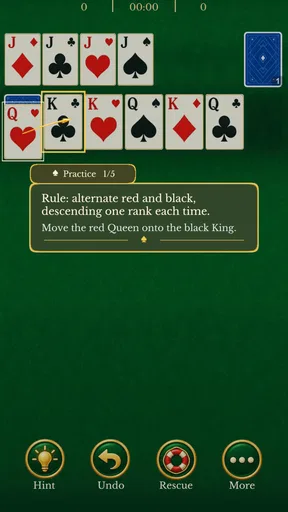
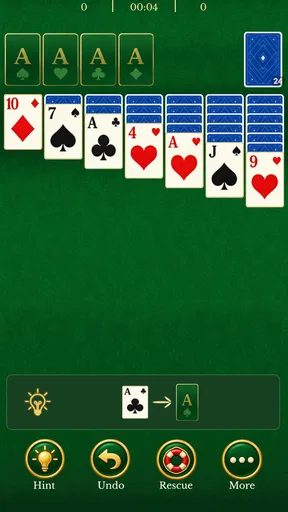
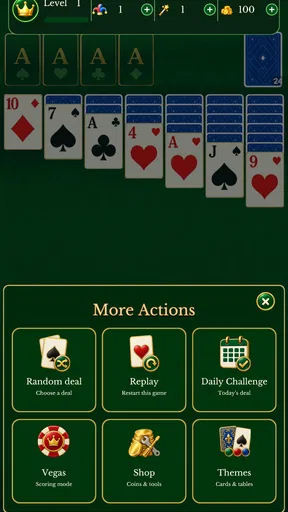
My advice for a first-time player is simple: begin with the ordinary solitaire layout instead of immediately treating the extra options as something you need to master. The custom themes are there to change the visual mood, and the Joker moves are useful as a special tool, but neither should distract from learning the basic flow. First, look for exposed cards that can be moved to build descending sequences with alternating colors. Then check whether a move opens a face-down card. That second result is often more valuable than making a move that merely rearranges cards.
The game’s free price makes this trial especially easy. You can install it without making a purchase decision first and decide from actual play whether the presentation suits you. I prefer this approach for solitaire because the right choice is personal: some players want a very plain digital deck, while others appreciate themes and gentle variations. My Solitaire sits between those preferences rather than trying to replace every possible card app.
One practical habit helped me get comfortable quickly. Before moving anything, I scan the tableau for cards that are already available and identify which move will reveal a hidden card. I then check the stock and foundation areas before committing. This prevents the common beginner mistake of moving cards just because a legal move is visible. In solitaire, a legal move is not always a useful move, and the app’s Joker option can make that temptation even stronger.
The first meaningful success is opening space
For a new player, the first satisfying milestone should not be finishing an entire game. It should be uncovering a face-down card through a deliberate sequence. That moment shows that you are managing the layout rather than moving cards at random. I recommend focusing on one empty column or one newly exposed card at a time, then checking whether the resulting space can accept a King or a useful sequence.
Worth Reading Before You Choose

Flipboard Shows What News Apps Must Do Beyond the Feed

Switching to Android Auto Means Rethinking Your Driving Routine

Google Calendar Makes a Crowded Week Easier to Manage

Ludo King Makes the Most of the Minutes Between Plans

Baby Panda World Brings Quick Play to Modern Phones, but Its Game Library Feels Busy

ESPN’s Live Game View Makes Following Close Games Easier
Joker moves change the way I think about a difficult position. I treat the Joker as a recovery tool, not as a replacement for planning. Using it too early may solve an immediate blockage while leaving the rest of the tableau just as restricted. Saving it until a move genuinely opens the board is usually more satisfying and gives the special rule a clear purpose. The exact value of the Joker depends on the position, so I would not spend it simply because it is available.
This is also where the game can be more interesting than a completely bare-bones solitaire clone. The familiar rules provide a stable foundation, while the Joker creates a small risk-and-reward decision. Players who already know solitaire will probably understand the basic strategy immediately, but they still need to adjust their timing. A Joker can rescue a stalled layout, yet it can also encourage careless play if used as a shortcut every time the next move is not obvious.
When a deal starts to look difficult, I pause before assuming it is lost. I review the foundation piles and ask whether I have been sending low cards upward too quickly. Building the foundation is normally the goal, but a card may still be needed temporarily in the tableau to unlock another column. That trade-off is easy to overlook when the interface makes foundation progress feel like the most visible sign of success.
What the daily challenges add to a familiar format
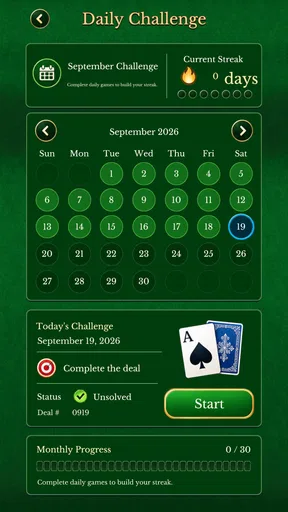
Daily challenges give the game a reason to return to the same basic activity instead of treating every session as interchangeable. I see them as a gentle routine rather than a competitive obligation. A player who enjoys checking in during a break can use a challenge as a clear starting point, while someone who prefers relaxed play can ignore that structure and continue with ordinary deals.
The useful distinction is between challenge-driven play and comfort-driven play. If you want a predictable daily goal, the challenge feature may make the app feel more purposeful. If you want to replay a particular style of deal or simply pass time without thinking about progress, the extra structure may not matter much. I would not choose this game solely for daily challenges, but they help prevent the experience from becoming completely repetitive.
There is a small psychological trap here: a daily task can make a casual game feel like an obligation. I recommend treating it as an optional prompt. Missing a session should not change whether the app is worthwhile for you. Solitaire works best when it fits around your day, such as during a commute, while waiting for an appointment, or after finishing a short household task.
Custom themes are useful, but they are not the whole experience
The custom themes are a welcome touch because card games are viewed for long periods, and visual comfort matters more than it might in a fast action game. I would choose a theme based on contrast and readability first, then worry about style. A decorative background is not an improvement if it makes the cards or suits harder to distinguish.
Changing the theme can also make the game feel less monotonous after repeated sessions. That said, themes do not change the underlying strategy. If you are deciding between this app and another solitaire game, I would treat customization as a secondary advantage. The important questions are whether the card layout feels clear, whether the touch controls respond naturally, and whether the Joker and challenge systems match the way you like to play.
On a phone, I suggest holding the device in the position that gives you the clearest view of the full layout rather than changing themes repeatedly to compensate for poor visibility. Solitaire requires comparing several columns at once, so a comfortable view is more valuable than a visually striking one. This is one of those small setup choices that can make the first successful game feel much less frustrating.
Common confusion during the first few games
The most likely confusion is understanding what the Joker should do in relation to ordinary moves. Because it is more flexible than a standard card action, it can look like the easiest answer whenever the layout slows down. I found it more helpful to think of it as a limited strategic decision. Before using one, I ask whether it will expose a hidden card, create an empty column, or let me begin a sequence that would otherwise remain blocked. If the answer is no, I wait.
Another common issue is confusing visible movement with progress. Moving a long alternating-color sequence may look productive, but if it does not reveal a card or improve access to the stock, it may only rearrange the problem. New players can make better decisions by counting opportunities rather than moves: how many face-down cards became available, how many columns became flexible, and whether the foundation gained a card without removing an important option from the tableau.
It is also easy to send cards to the foundation too quickly. In a physical game, players often develop the habit of placing every eligible card there immediately. In a digital game with special moves, that habit can be less reliable. I keep an eye on whether a low card is still useful for building a sequence. If moving it upward prevents a higher card from being placed elsewhere, I leave it where it is until the tableau is more open.
Players coming from other solitaire apps may also expect identical rules, scoring, or controls. I would avoid assuming that a familiar gesture has the same result everywhere. Spend the first few minutes observing how cards respond to taps and drags, and use the simplest interaction that feels reliable. That small adjustment matters on a phone, where a mis-tap can interrupt a carefully planned sequence.
How it compares with plain solitaire alternatives
A minimal solitaire app may be better for someone who wants nothing beyond a clean deck, a simple layout, and no extra decisions. My Solitaire is a stronger fit for players who like classic play but want a little personality through themes and a Joker-based option. The difference is not about one approach being universally superior; it is about whether you want the traditional routine to remain completely untouched.
Compared with a large card-game collection, this game should feel more focused. A collection app is the better choice if you regularly switch between many solitaire variants, poker-style games, or other card formats. Here, the appeal comes from staying with one recognizable format and adding modest reasons to return. That focus can feel refreshing, but it also means players seeking a broad catalog may outgrow it quickly.
Experienced solitaire players should consider how much control they want over difficulty and rules before committing to it as their only card app. The Joker can soften a hard position, which is helpful for casual sessions but may reduce the satisfaction of solving a completely traditional deal. I would use the special move when I want a relaxed break, and choose a stricter alternative when I want the challenge to come entirely from standard planning.
The rating shown for the game is a 4.7 average from 216 ratings, and the app has passed 10K installs. Those figures suggest that it has found a modest audience, but I would still judge it by your preferred style of solitaire rather than popularity alone. The developer, Misiona Puzzle, has positioned it as a compact card game rather than a broad gaming platform, and that narrow purpose is part of its identity.
A realistic everyday session
Imagine having ten minutes before leaving for an appointment. I would open the game, choose a readable theme, and start a standard deal rather than spending the whole break exploring settings. My first goal would be to expose one hidden card. If the layout offered a useful sequence, I would build it carefully; if the board stalled, I would inspect whether a Joker could create a real opening instead of using it automatically.
If the session ended before the deal was complete, that would not make it wasted time. The game is well suited to stopping and returning to a familiar card layout, provided you are comfortable continuing the same position later. For a longer evening session, I would try a daily challenge after warming up with one ordinary game. That order reduces pressure and lets me approach the challenge with a clearer sense of how the app handles its special move.
This kind of flexible session is where the game makes the most sense to me. It is not trying to deliver a dramatic story or a complicated progression system. Its value is that a short pause can become a small mental exercise, while a longer session can develop into careful planning. The experience remains calm, but it is not entirely passive if you pay attention to which move preserves future options.
Who should try it and who should skip it
I recommend My Solitaire to first-time solitaire players who want familiar rules with a little assistance when a deal becomes awkward. It is also suitable for casual players who enjoy changing the look of a game and having a daily reason to return. The Everyone age rating and free price make it easy to suggest as a low-risk option for a family member who simply wants a card game on a compatible device.
I would be more cautious about recommending it to strict traditionalists. If your enjoyment depends on solving every deal without special help, the Joker may feel like an unwanted shortcut. I would also point frequent card-game explorers toward a broader collection if they need multiple variants in one place. Finally, people who dislike repeated layouts or daily prompts may find the focused design too narrow over time.
My overall view is positive because the app keeps its promise at the level that matters: it provides classic solitaire and adds features that can support, rather than overwhelm, the basic game. The strongest way to use it is to learn the ordinary flow first, reserve Joker moves for meaningful openings, and choose themes for clarity as much as appearance. With that approach, the first successful action arrives quickly, and later sessions gain depth without becoming complicated.
For me, this is a good companion for quiet, short card sessions rather than a definitive replacement for every solitaire alternative. Its 4.7 average rating reflects a favorable response, and the free download makes trying it straightforward. If you want a focused card game with custom presentation, daily challenges, and a forgiving twist on familiar solitaire, I think it is worth installing. If you want strict rules, extensive variants, or a more demanding competitive experience, another option will probably suit you better.
Pros
- Simple interface makes it easy to start playing immediately.
- Includes several solitaire variations for added variety.
- Playable offline
- making it useful during travel or downtime.
- Short rounds suit quick breaks and casual play.
- Hints can help new players learn possible moves.
Cons
- Some features may be limited unless you watch ads or upgrade.
- Frequent ads can interrupt the flow between games.
- Limited customization may disappoint players seeking more themes.
- Random deals can occasionally feel repetitive over long sessions.
- Performance may vary on older phones or tablets.
FAQs for My Solitaire-Card Game
What is My Solitaire-Card Game, and how is it played?
My Solitaire-Card Game is a digital solitaire experience designed for players who enjoy classic card puzzles on a phone or tablet. It generally follows familiar solitaire rules, where you arrange cards in descending order and alternating colors while building each suit from Ace to King. The app is suitable for short sessions, whether you are a beginner learning the basics or an experienced player looking for a relaxing challenge.
Is My Solitaire-Card Game free to download and play?
My Solitaire-Card Game can typically be downloaded without an upfront purchase, allowing users to try the main solitaire gameplay before committing financially. However, free versions of card games may include advertising, optional purchases, or additional features that require payment. Before downloading, check the store listing for the current pricing model, available in-app purchases, and whether certain themes, hints, or ad-removal options are restricted.
Does My Solitaire-Card Game work without an internet connection?
Solitaire is usually well suited to offline play because the core game does not require real-time multiplayer or constant online communication. My Solitaire-Card Game may allow you to start and complete standard games without mobile data or Wi-Fi, which is useful during travel or when trying to save data. Some features, such as advertisements, cloud synchronization, updates, or leaderboards, may still require an internet connection.
Is My Solitaire-Card Game suitable for beginners?
Yes, My Solitaire-Card Game should be accessible to beginners because solitaire uses straightforward card movements that become easier after a few rounds. New players can learn by focusing on uncovering hidden cards, creating empty tableau spaces, and building foundation piles in order. If the version you install includes hints, undo controls, tutorials, or selectable difficulty levels, these tools can make the learning process less frustrating.
What should I check before installing My Solitaire-Card Game?
Before installing My Solitaire-Card Game, review the app’s latest store description, screenshots, ratings, permissions, supported operating-system version, and download size. It is also worth checking whether the game contains advertisements, optional purchases, tracking, or features that need an internet connection. Players who care about privacy should read the developer’s data-safety information, while users with older devices should confirm compatibility and performance expectations.


